Gullu
Is Apple Pencil Good for Kids? Ages, Models and Coloring on iPad
Short answer: Most children can hold a stylus like a pencil from about age 4, when the CDC says most hold a crayon between fingers and thumb. Apple's pages give no minimum age for Apple Pencil. It is optional for coloring, since a finger works too, and the model you need depends on your iPad.
Can a 3- to 7-year-old use an Apple Pencil?
Yes, from about 3 or 4 with an adult nearby. The Apple pages we read give no age guidance for Apple Pencil, so the best guide is how children hold crayons. The American Academy of Pediatrics says a 3-year-old can hold a crayon like an adult instead of in a fist (AAP), and the CDC lists a fingers-and-thumb hold as a 4-year milestone (CDC).
| Age | How most children hold a drawing tool | What that means for a stylus |
|---|---|---|
| Under 3 | In a fist, with big arm movements (Zero to Three) | A finger on the screen is simpler |
| 3 to 4 | Fingers and thumb, still maturing (AAP, CDC) | Can try a stylus with supervision |
| 5 to 7 | Mature grips are common (Schneck & Henderson, 1990) | Can use a stylus for detail |
The last column is our judgment, not a research finding. In the study behind the bottom row, 48% of the youngest children (age 3) used a mature grip and 90% of the oldest (age 6) did.
Finger or stylus: which is better for young kids?
Neither is proven better. We did not find a study comparing finger and stylus coloring in young children. For the youngest, a finger is simpler: nothing to hold, drop or lose. From about 4, a stylus lets a child use the same hold they use for a crayon and reach small areas a fingertip covers up.
A practical test is to watch your child with a crayon. If they hold it with fingers and thumb and can color a medium-sized area, a stylus will probably feel natural. If they still grip in a fist, wait, and let them color with a finger.
Either way, screen coloring adds to paper and crayons. It does not replace them. Our coloring milestones guide shows what to expect on paper at each age.
Which Apple Pencil works with which iPad?
It depends on the exact iPad model. Apple sells or supports four Apple Pencil models, and each works only with certain iPads. This table follows Apple's compatibility page, dated November 5, 2026 (Apple Support). Check that page before buying, because the list changes when new iPads come out.
| Apple Pencil model | Works with, per Apple |
|---|---|
| Apple Pencil Pro | iPad Pro 13-inch and 11-inch (M4 and M5); iPad Air 13-inch and 11-inch (M2, M3 and M4); iPad mini (A17 Pro and A20 Pro). Needs iPadOS 17.5 or later |
| Apple Pencil (USB-C) | The iPads above, plus iPad Pro 11-inch (1st to 4th generation), iPad Pro 12.9-inch (3rd to 6th generation), iPad Air (4th and 5th generation), iPad (A16), iPad (10th generation) and iPad mini (6th generation). Needs iPadOS 17.1.1 or later. Also iPhone Duo with iOS 27.2 |
| Apple Pencil (2nd generation) | iPad mini (6th generation), iPad Air (4th and 5th generation), iPad Pro 12.9-inch (3rd to 6th generation), iPad Pro 11-inch (1st to 4th generation) |
| Apple Pencil (1st generation) | iPad (6th to 9th generation), iPad mini (5th generation), iPad Air (3rd generation), iPad Pro 12.9-inch (1st and 2nd generation), iPad Pro 10.5-inch and 9.7-inch. Also iPad (10th generation) and iPad (A16) with a USB-C to Apple Pencil Adapter |
To find your model, Apple says to open Settings, then General, then About, and read Model Name (Apple).
The models also differ in features. According to Apple's Apple Pencil page:
- Apple Pencil Pro responds to pressure and tilt, pairs and charges magnetically on the side of the iPad, and can be located in the Find My app.
- Apple Pencil (USB-C) has tilt sensitivity but not pressure sensitivity. It pairs and charges with a USB-C cable and attaches magnetically for storage. Find My is not listed for it.
- Apple Pencil (1st generation) is sensitive to pressure and tilt and pairs and charges through its Lightning connector, under a removable cap (Apple tech specs).
For a young child filling in a coloring page, the question that matters most is simply which model fits the iPad you already own.
Are cheaper kids' styluses fine?
We can't say, because we have not tested them and this guide does not review or rank other brands. Apple's pages cover only Apple Pencil. If you are looking at another stylus, check the maker's own compatibility list against your exact iPad model, and check that the tip and any caps are firmly attached before handing it to a young child.
Does a stylus help pencil grip?
There is no evidence either way in the studies we read. None tested whether stylus use improves how a child holds a pencil. Research on tablets and hand skills in general is mixed. In one 24-week study of 80 preschoolers, the children who did manual play activities improved more in fine motor precision and dexterity than those who used a touch-screen tablet (Lin et al., 2017). A smaller study of 78 children aged 24 to 42 months found fine motor scores slightly favoring the tablet users (Souto et al., 2020).
It also helps to know that grip style matters less than many parents fear. In a study of 120 fourth graders, the type of pencil grasp made no significant difference to handwriting speed or legibility (Schwellnus et al., 2012).
So buy a stylus because your child enjoys it or wants finer control, not as a handwriting tool. Crayons, pencils, playdough and scissors remain the main practice for hands.
How do you keep it from getting lost or chewed?
Supervise, store it in one place, and know which parts come off. Apple's support pages show that the tip can be removed on Apple Pencil Pro, Apple Pencil (2nd generation) and Apple Pencil (USB-C), and that the 1st generation model has a removable cap (Apple Support). Small loose parts and young children do not mix, so treat the pencil as a with-an-adult tool for the under-5s.
Habits that help:
- One home. Models that attach magnetically to the iPad are easiest to keep track of. Otherwise use a case with a pencil holder or a set drawer.
- Check the tip. Make sure it is snug before each session and look for chew marks afterward.
- No walking with it. Sit at a table, as you would with a sharp pencil.
- Find My. Apple lists Find My support for Apple Pencil Pro only.
Do coloring apps work with Apple Pencil?
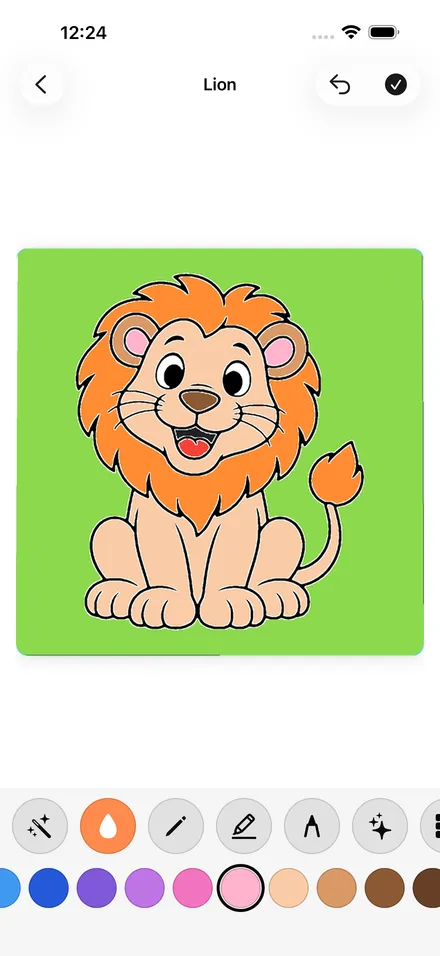
It is up to each app, so check the App Store listing before you buy a pencil for coloring. Gullu, our coloring app for iPhone, iPad and Mac, works with Apple Pencil and needs iPadOS 17 or later on iPad; it also works with a finger. Our guide to choosing a coloring app lists what else to check, such as ads and purchase prompts.
FAQ
What age is Apple Pencil for?
The Apple pages we read state no minimum age. Going by grip milestones, many children can manage a stylus from about 4, with supervision. Younger children usually do better with a finger.
Does Apple Pencil work with every iPad?
No. Each Apple Pencil model works only with the iPads on Apple's list for that model. Check Apple's compatibility page for your exact iPad before buying.
Is coloring with an Apple Pencil screen time?
Yes. Coloring on an iPad counts as screen time whatever the child holds. See our guide to screen time and creative apps for what the WHO and the AAP advise.
What if my child prefers paper?
Then use paper. Our printable coloring pages include one free page in each theme, and crayons need no charging.
Sources
- Apple Support, "Apple Pencil compatibility" (published November 5, 2026): https://support.apple.com/en-us/108937
- Apple, "Apple Pencil": https://www.apple.com/apple-pencil/
- Apple Support, "Apple Pencil (1st generation) - Tech Specs": https://support.apple.com/en-us/111920
- Apple Support, "Find the serial number of your Apple Pencil": https://support.apple.com/en-us/109031
- CDC, "Important Milestones: Your Child By Four Years": https://www.cdc.gov/act-early/milestones/4-years.html
- HealthyChildren.org (AAP), "Hand and Finger Skills of Your Preschooler": https://www.healthychildren.org/English/ages-stages/preschool/Pages/Hand-and-Finger-Skills-of-Your-Preschooler.aspx
- Zero to Three, "Learning to Write and Draw": https://www.zerotothree.org/resource/learning-to-write-and-draw/
- Schneck, C. M., & Henderson, A. (1990). Descriptive analysis of the developmental progression of grip position for pencil and crayon control in nondysfunctional children. American Journal of Occupational Therapy, 44(10), 893–900: https://pubmed.ncbi.nlm.nih.gov/2248351/
- Schwellnus, H., et al. (2012). Effect of pencil grasp on the speed and legibility of handwriting in children. American Journal of Occupational Therapy, 66(6), 718–726: https://pubmed.ncbi.nlm.nih.gov/23106992/
- Lin, L.-Y., Cherng, R.-J., & Chen, Y.-J. (2017). Effect of touch screen tablet use on fine motor development of young children. Physical & Occupational Therapy in Pediatrics, 37(5), 457–467: https://pubmed.ncbi.nlm.nih.gov/28071977/
- Souto, P. H. S., et al. (2020). Tablet use in young children is associated with advanced fine motor skills. Journal of Motor Behavior, 52(2), 196–203: https://pubmed.ncbi.nlm.nih.gov/31007146/